
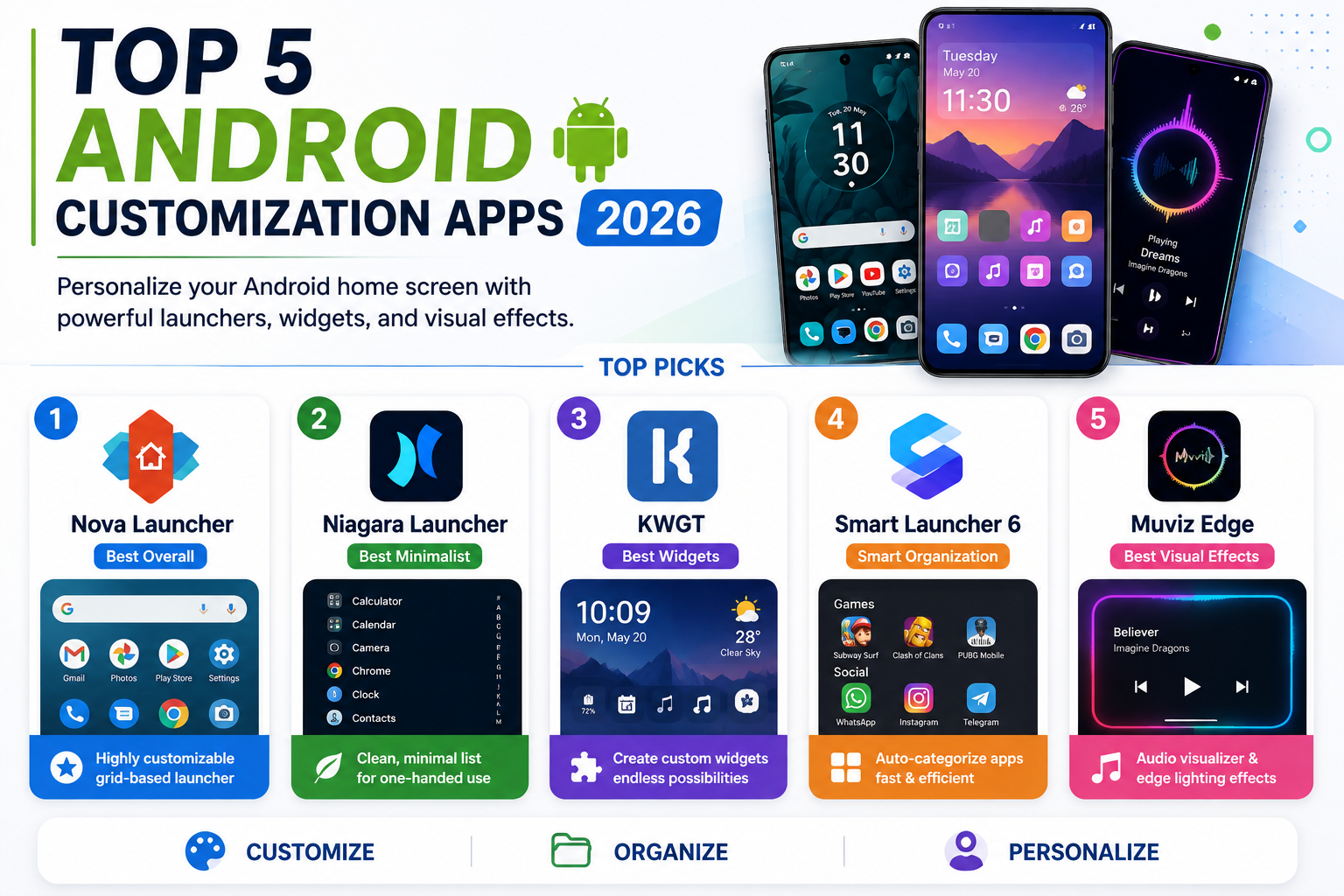
Home screen customization remains one of the genuinely distinctive advantages Android holds over iOS, letting users replace the entire launcher experience rather than just rearranging icons within a fixed system layout. A mature ecosystem of third-party launchers and widget tools has grown around this openness, ranging from deeply configurable grid-based launchers that let every icon, gesture, and animation be tuned precisely, to minimalist alternatives that strip the home screen down to a clean, scrollable list. Here’s a look at the Android customization apps worth knowing about this year, whether the goal is a fully personalized visual showcase or a calmer, more distraction-free home screen.
Nova Launcher
Nova Launcher remains the most powerful and widely used third-party launcher on Android, offering deep customization across icon shape and size, grid subgrid positioning, gesture controls, and thousands of supported icon theme packs from the Play Store. Its Material You color integration lets a home screen pull colors directly from the system theme or a user’s own chosen palette, and its backup and restore feature makes moving an entire custom setup between phones a genuinely painless process rather than rebuilding everything from scratch. For anyone who wants maximum configurability within a familiar grid-based layout, Nova remains the reference point every other launcher in this category gets compared to.
Niagara Launcher

Niagara Launcher takes a deliberately different approach from grid-based launchers, replacing the traditional app grid with a clean, scrollable alphabetical list and up to eight pinned favorite icons, built specifically around one-handed use and minimal visual clutter. Its dynamic theming automatically matches icon and text colors to a chosen wallpaper’s dominant color, giving a genuinely cohesive look without requiring manual color tuning for every element the way more granular launchers do. Notification previews appear directly beneath an app’s entry in the list, letting users read incoming messages without ever fully opening the app, which has made it a favorite specifically among users who want a calmer, less distracting home screen rather than a densely packed showcase.
KWGT (Kustom Widget Maker)
KWGT functions as a genuinely powerful widget creation engine rather than a launcher itself, letting users design fully custom clocks, weather displays, and information widgets down to individual visual elements using a formula-based editor, or simply download and apply thousands of pre-made widget packs created by the wider Kustom community. It pairs particularly well with Nova Launcher or Niagara for users building an elaborate, cohesive visual theme across their entire home screen, since KWGT widgets can be styled to match nearly any aesthetic a user has in mind. The learning curve for building fully custom widgets from scratch is real, but the enormous library of ready-made presets means most users can achieve a genuinely personalized look without ever touching the formula editor directly.
Smart Launcher 6
Smart Launcher 6 distinguishes itself with an adaptive category system that automatically sorts installed apps into folders like Social, Games, or Productivity without requiring manual organization, alongside genuinely fast performance even on lower-end hardware where more resource-intensive launchers can feel sluggish. Its distinctive circular app icon grid and gesture-based navigation give it a visual identity clearly distinct from both Nova’s traditional grid and Niagara’s list-based approach, appealing to users who want something that looks meaningfully different without sacrificing everyday usability. A built-in icon pack creator also lets users design their own consistent icon set directly within the app rather than needing to find a matching third-party icon pack.
Muviz Edge
Muviz Edge takes customization in a more playful, expressive direction, adding animated audio visualizers and edge lighting effects around the screen border that react in real time to whatever music or media is currently playing on the device. Rather than replacing the entire launcher and app organization system, it layers on top of an existing setup as a visual accent, making it a natural pairing with any of the launchers above for users who want an extra expressive flourish rather than a complete home screen overhaul. Its wide library of pre-built visualizer styles and edge lighting animations makes it easy to find a look that fits without needing any design skill to configure from scratch.
These five tools largely complement rather than compete with one another, since only Nova, Niagara, and Smart Launcher actually replace the core launcher, while KWGT and Muviz Edge layer additional customization on top of whichever launcher is already in place. Users who want maximum granular control within a familiar grid layout should start with Nova Launcher, while anyone drawn to a calmer, more minimalist home screen should try Niagara instead. KWGT is worth adding to either setup for anyone who wants genuinely custom widgets rather than a launcher’s built-in defaults, and Muviz Edge is a fun final layer for users who specifically want their home screen to react visually to music and media.
Conclusion
Android’s openness to genuine home screen customization remains one of its clearest differentiators, and 2026’s lineup of launchers and widget tools makes it entirely possible to build a home screen that looks and feels nothing like the default experience a phone ships with. Whether the goal is a densely packed, highly personalized showcase or a calm, minimalist list of favorite apps, this year’s top five customization tools each offer a genuinely different and well-supported path to making an Android home screen feel like it actually belongs to its owner.