
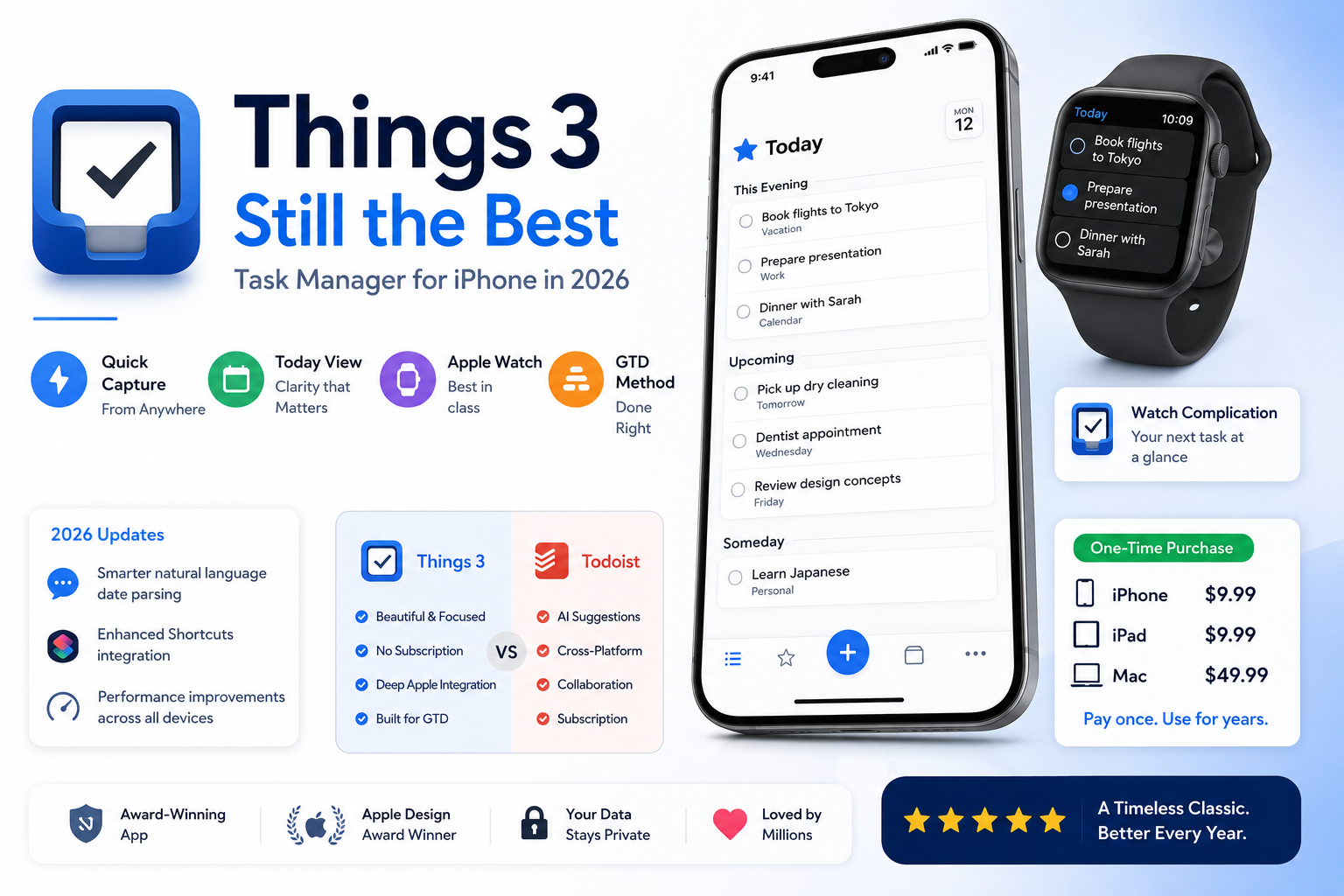
Things 3 by Cultured Code is one of the most acclaimed iOS apps ever made. It has won Apple Design Awards, been featured in Apple marketing, and maintained a passionate user base for years despite increasing competition from subscription-based alternatives offering AI features and cross-platform availability. In 2026, with Todoist adding AI suggestions, Notion adding task management, and ClickUp aggressively expanding, does Things 3 still justify its premium one-time price for iPhone users who take productivity seriously? This review answers that question after four months of daily use.
The Core Things 3 Philosophy
Things 3’s design philosophy is deceptively simple: reduce the friction between having a task to capture and capturing it, then provide a clean system for deciding what to do and when. The Getting Things Done methodology – capturing everything, organising by context and project, and reviewing regularly – is implemented with a fidelity to the original system’s intent that most GTD apps compromise in favour of feature breadth.
This simplicity is a deliberate choice that Cultured Code has defended against feature requests for years. Things 3 does not have built-in calendar integration. It does not have built-in collaboration features. It does not have AI-generated task suggestions. These omissions frustrate users who expect everything from a single app, but they are what makes the experience of using Things 3 feel clean and focused rather than overwhelming.
What Things 3 Does Better Than Any Alternative in 2026
The capture experience is the gold standard. Natural language input – typing ‘dentist appointment next Tuesday at 2pm’ correctly parses the date and time without any additional steps. The Quick Entry shortcut from anywhere in the iPhone experience creates a new task without switching apps. The inbox processing discipline that Good GTD requires is well-supported by Things 3’s clean inbox view.
The Today view is the most important daily interface in any task manager, and Things 3’s implementation remains the most thoughtfully designed available. It shows only what matters today, separates scheduled tasks from tasks you have pulled in manually, and maintains a clean visual hierarchy that does not overwhelm. Competing apps add information density in the name of features but lose the clarity that makes the Today view useful as a daily planning tool.
Apple Watch integration is the best of any task manager on watchOS in 2026. Completing tasks from the wrist, checking the next action for the current project, and the complication that shows your next scheduled task on the watch face all work flawlessly. For Apple Watch users who want frictionless task management access without taking out their iPhone, Things 3 provides the best implementation available.
The 2026 Updates – What Cultured Code Added
Cultured Code continues improving Things 3 with free updates that are smaller and more focused than the major releases of competing subscription apps but consistently improve specific areas of the experience. The 2026 updates include improved natural language date parsing for more complex expressions, enhanced Shortcuts support that allows more sophisticated automation workflows, and performance improvements that make the app noticeably faster on older supported devices.
The Shortcuts integration in particular has become a meaningful differentiator in 2026 for power users who automate their workflows. Creating tasks from Shortcuts with full metadata including project, area, tags, deadline, and notes is now more capable than most competitors including Todoist’s Shortcuts implementation.
Things 3 vs Todoist in 2026 – The Real Comparison
The most common comparison is Things 3 versus Todoist, and it is genuinely close in 2026. Todoist has AI suggestions for dates and priorities, cross-platform availability on Windows and Android which Things 3 lacks, collaboration features for shared task lists, and a subscription model that includes ongoing feature additions.
Things 3 wins on user experience quality, Apple platform integration depth, and the no-subscription model for iPhone-only or Apple-ecosystem-only users. The Things 3 design is simply more beautiful and more considered than Todoist’s, which for users who care about their daily tools’ aesthetic quality is a real differentiator.
For iPhone users who also need Windows or Android access, Todoist or TickTick are more practical. For iPhone users who work exclusively in the Apple ecosystem and want the best-designed task manager available without a recurring subscription, Things 3 is the clear choice in 2026.
The Pricing Case in 2026
Things 3 is a one-time purchase at nine dollars and ninety-nine cents for iPhone, nine dollars and ninety-nine cents separately for iPad, and forty-nine dollars and ninety-nine cents for Mac. For iPhone-only users, the ten dollar purchase provides years of use without any additional subscription cost. Todoist Pro costs four dollars per month – the same money buys two and a half years of Things 3.
The no-subscription model is genuinely valuable for users who have experienced the accumulated cost of multiple productivity subscriptions. Things 3’s pricing structure respects that a well-designed, maintained app provides lasting value without requiring ongoing payment to access functionality you have already purchased.
Who Should Buy Things 3 in 2026
iPhone users primarily or exclusively in the Apple ecosystem who want the most elegantly designed GTD task manager available. Users who have tried subscription-based alternatives and found the ongoing cost and feature sprawl undesirable. Users who value design quality in their daily tools and want the task management interface they see dozens of times per day to be beautiful. Users who follow the GTD methodology seriously and want a tool built specifically around its principles rather than adapted to them as a secondary consideration.
Download Things 3 for iPhone on the App Store. Download Things 3 for iPad on the App Store. Visit www.culturedcode.com for the Mac version and full feature details